iOS Settings
If you open the iOS app Settings then myTracks will be listed there too. The following settings can be made:
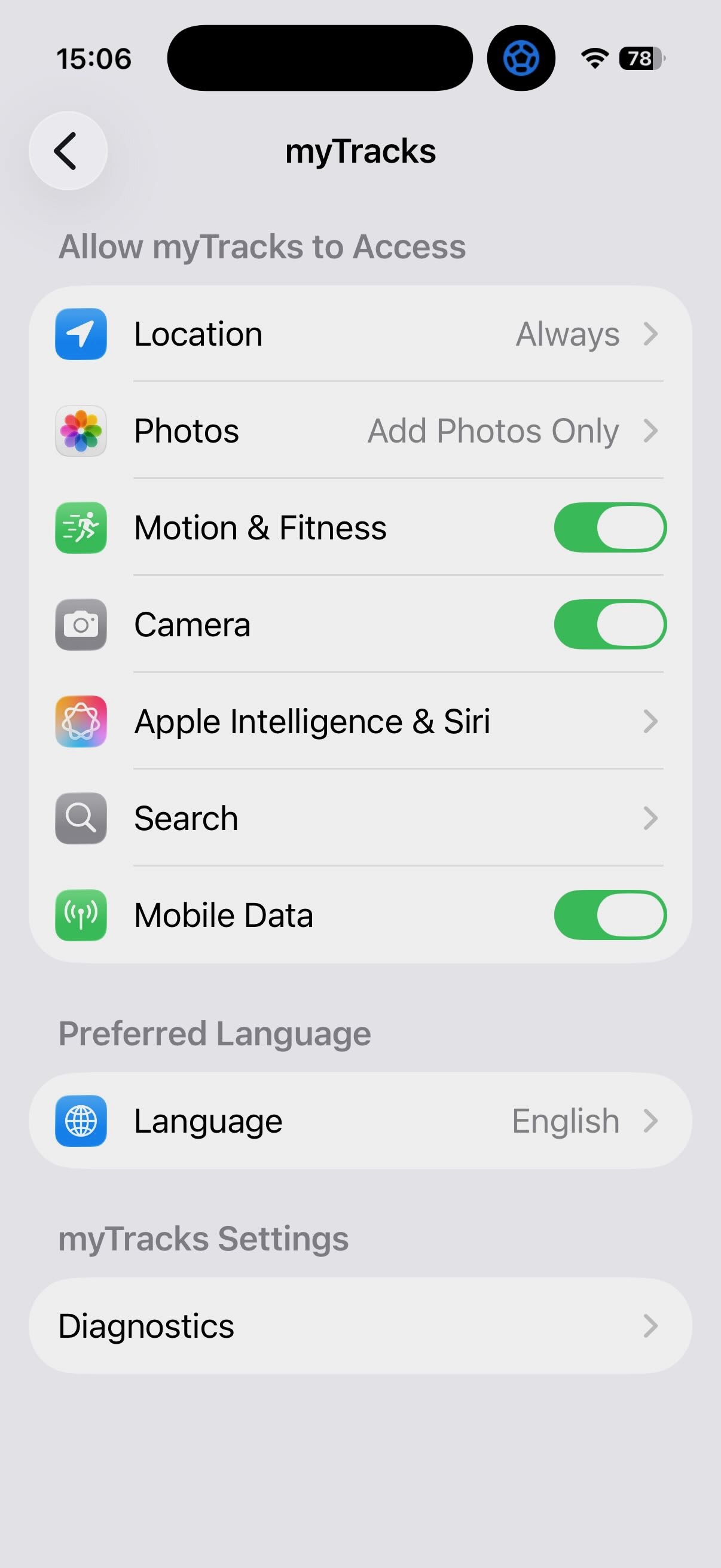
- Location: If possible, this setting should be set to Always so that myTracks can record tracks. If Never is selected instead, no recordings can be made with myTracks. You can also choose when using the app. That's ok for a regular recording. The diary mode, however, requires the setting Always.
- Photos: This feature must be set to Add Photos only if you want myTracks to store copies of the photos created with myTracks in the iOS Album.
- Motion & Fitness: myTracks uses the movement data of the iPhone to optimize the battery consumption. Namely, the GPS chip is turned off when the iPhone does not move for a while. myTracks works even if this setting is disabled. However, the battery consumption can then not be optimized.
- Camera: This function must be activated if you want to take photos with myTracks.
- Mobile Data: If you also want to load data over the mobile network, then this function must be activated. myTracks then uses the mobile network in particular for loading map data. To record GPS tracks, this setting need not be active.
- Diagnostics: Here you can activate some diagnostic functions. You will typically only need these if you are asked to do so in a support request.